Welcome to this edition of our Tools for Thought series, where we interview founders on a mission to help us think better and work smarter. Dr David Urbansky is the founder of Linkflare, a universal bookmark manager that helps you save links, read distraction-free, and never forget the information that matters to you.
In this interview, we talked about why saving information is not the same as remembering it, how to turn bookmarks into useful knowledge, why spaced repetition belongs in a bookmarking tool, how automation can reduce the work of organizing information, why personal knowledge may matter even more in the age of AI, and much more. Enjoy the read!
Hi David, thank you for joining us. You believe that bookmarks should be more than a collection of saved links. Why does that matter?
I’m the kind of person who keeps lists of everything. I’ve been running my life on David Allen’s Getting Things Done for years, so I have to-do lists, someday-maybe lists, lists of things to remember. And it doesn’t stop at tasks: movies I want to watch, recipes I want to try, books, places we might visit one day. Capturing things is how I close open loops. Once something is written down, my head can let it go.
The problem was never the capturing, it was where everything ended up. The movies lived in watchlists on three different streaming platforms. The recipes sat in chat threads. Interesting quotes and facts went into a notebook or onto sticky notes, and book takeaways into OneNote, where I’ve kept my lists for twenty years now. Every app is happy to hold its own little list. None of them talk to each other, and none of them care whether you ever come back.
But coming back is the whole point. A bookmark is a small promise to your future self: I will read this, cook this, remember this. Most tools let you break that promise silently. I’d finish a book full of ideas, write down the takeaways, and six months later I couldn’t find the notes, let alone remember the ideas. Saving something feels productive in the moment, but saving is not remembering. That gap between what I collected and what I could actually find and use again bothered me for a very long time.
How did you come up with the idea for Linkflare?
My whole career has been about teaching machines to read the web. I did my PhD on web content extraction and assessment, and afterwards I built data APIs for developers. The biggest one, spoonacular, takes recipes and food content and turns them into structured information: ingredients, amounts, nutrition, cooking times. So for about fifteen years my job was helping companies turn messy web pages into clean data they could build products on.
Meanwhile, my own saved knowledge was a junk drawer. My bookmarks were plain URL strings. My reading backlog lived in Pocket. My lists were scattered across half a dozen apps. At some point the irony became hard to ignore: I was pointing extraction technology at the web all day for other people’s products, and never at the thing I personally cared about most, which is my own library.
Pocket shutting down was the final push. I had years of saved reading in there, and suddenly the platform underneath it was simply gone. That made something very clear to me: what we save is only as durable as the app we save it into. So I built Linkflare, which is essentially everything I know about understanding web content, pointed at your personal library. When you save a link, the system should understand what it is, pull out the parts that matter, and help you actually come back to it.
Most bookmarking tools are good at saving content. Linkflare seems much more focused on what happens after you save them. Can you tell us more about that?
Saving is the easy part. Every tool can store a URL. The question I find much more interesting is what all those saved things should turn into later.
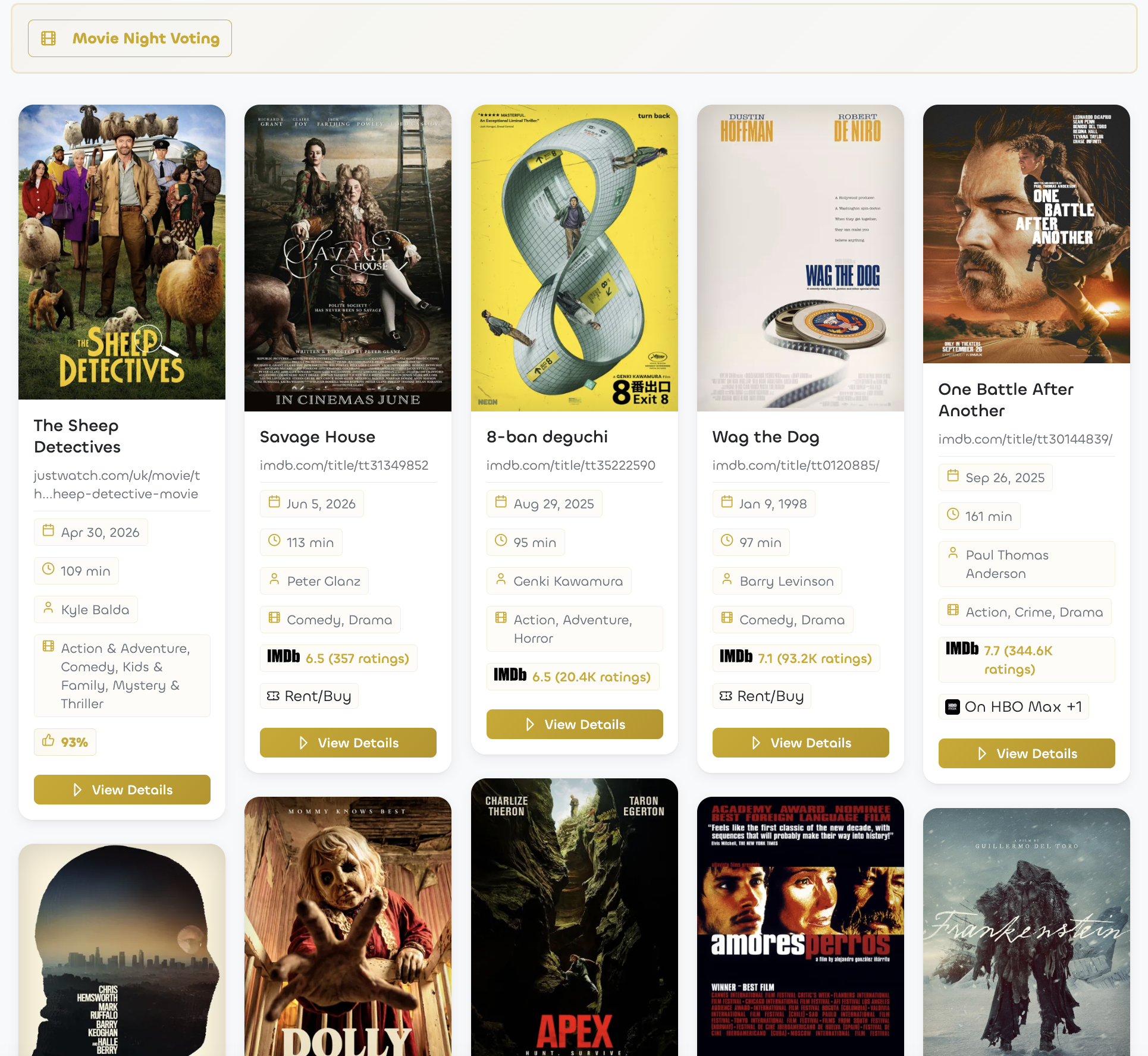
Sometimes the answer is very practical. My fiancée and I save recipes all week, and on the weekend they become an actual meal plan instead of a pile of screenshots. Before a movie night we don’t scroll through streaming menus for half an hour, we open our shared watch list, sort by rating and pick something. And when friends are over, there’s even a little movie-night voting mode, so everyone gets a say. None of that works if a bookmark is just a dead string.
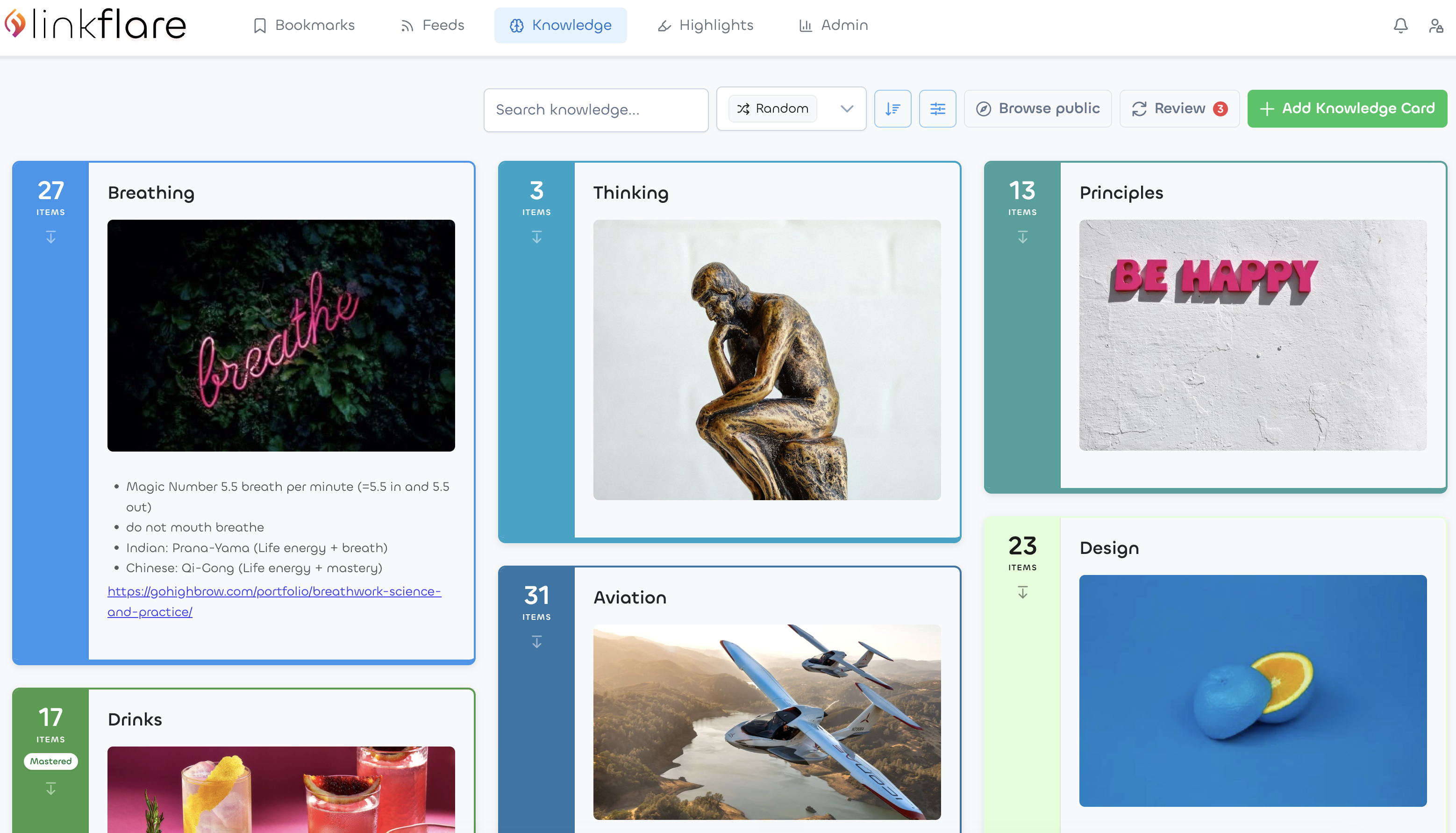
But the deeper answer is about memory. When I read an article and highlight the two paragraphs that actually matter, those highlights shouldn’t be buried in an archive. In Linkflare they can become knowledge cards, small pieces of knowledge in your own words, still connected to their source. And because knowledge fades when you never meet it again, spaced repetition is built in: the app resurfaces your cards for a short review right around the time you’d otherwise forget them. The reviewing happens in the same place as the collecting, with no extra app in between.
That’s the loop I care about. Save something in two seconds, actually read it, connect it to what you know, and remember it. Most tools stop after the first step.
People already have browser bookmarks, read-later apps, notes, and knowledge-management tools. What do you think is missing from that workflow?
Each of those tools holds one shard of the workflow. Browser bookmarks are just a title and a URL, no context, no memory. Read-later apps quietly fill up with things you’re never going to read. Notes apps hold pasted links nobody ever clicks again. And the knowledge-management tools are wonderful for your own thinking, but they’re an awkward home for the constant stream of things you find. The way I’d put it: Obsidian is where your own thoughts live. Linkflare is where the web’s knowledge lives, and gets remembered. They complement each other well.
What was missing for me personally was one trusted place with a loop built in. Take newsletters. I subscribe to more than I can read, Ness Labs included, and for years all those unread issues piling up in my inbox just made me feel guilty. My workaround was to save the article link to Pocket and archive the email, just to feel better. Now Linkflare subscribes to those feeds directly. New issues land in my link inbox next to everything else I’ve saved, I read them when I choose to, and my email inbox is for humans again.
Open tabs are the same story. If something looks interesting, I save it and close the tab with a clear conscience, because I know I’ll find it again.
Let’s talk about how Linkflare works in more detail. What does the experience look like for someone using it day to day?
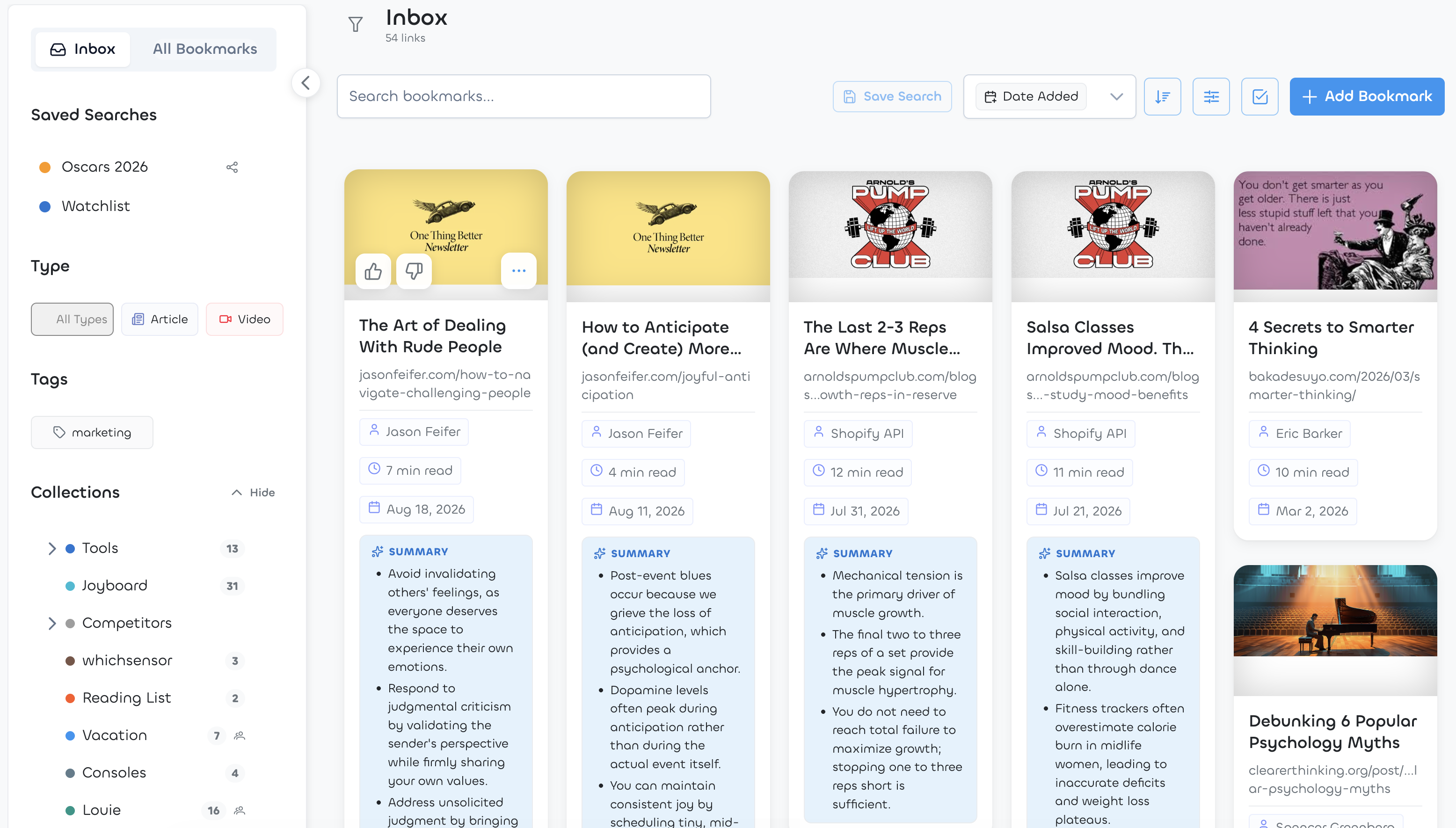
My day starts in the inbox. Overnight, my feeds have delivered new articles, and instead of doomscrolling, I read a few of them. When I’m short on time, the built-in summaries help me get through more. I subscribe to Arnold Schwarzenegger’s Pump Club, for example, which is excellent but comes out every day, and that gets overwhelming fast. For those, the summary pulls out the most important points so I don’t always have to read the whole issue. Funnily enough, they clearly know it too: each issue now ends with an AI-generated summary of its own, and those are great.
During the day, saving is a reflex. I come across a paper or a blog post, click the browser extension, done. My fiancée sends me a recipe on TikTok, I share it to Linkflare, and it extracts the actual recipe out of the video: ingredients, steps, servings. There’s an oven-baked Big Mac wrap in my account right now that started as a TikTok video she sent me, and we’ve cooked it many times since. I hear about a film, save it from IMDb, and it lands in the watch list with its rating and where it’s streaming.
The important part is that Linkflare does the librarian work to save time. It recognizes what kind of thing you saved, an article, a recipe, a movie, a place, fills in the right metadata, and my rules do the filing. Videos, for example, go automatically into my inbox to watch later.
In the evening I read saved articles in the clean reader view, or I have one read aloud to me while I go for a walk. Whatever I highlight along the way is waiting for me afterwards, ready to become something more permanent.
One of the distinctive ideas in Linkflare is that different bookmarks become useful in different ways. How does that work?
A recipe and a movie need different things from a bookmarking tool. “I’ll cook this” needs different help than “I’ll watch this” or “I’ll read this”, so Linkflare treats them differently.
When you save something, it figures out what it is and enriches it. Recipes get ingredients, cooking times and nutrition information, even when the source is a video with no written recipe anywhere. Movies and shows get the director, the IMDb rating and where you can currently stream them. Books get the author and page count, places get a map, products get the current price and can alert you when it drops. Articles get a reading time, a distraction-free reader, and audio if you’d rather listen than read.
That metadata is exactly what makes a collection useful later. When we can’t decide what to watch, I sort our watch list by IMDb rating and we pick from the top. When I want to bake something ambitious on a weekend, I check the time first: there’s a sourdough bread in my account that takes 60 hours from start to finish. That’s exactly the kind of thing you’d never find again in a chat thread. And none of it costs you anything at save time: you press one button and the rest fills itself in.
You offer quite a bit of automation, from metadata and AI tagging to organization rules. How do you balance automation with letting people organize things their own way?
My rule is that automation prepares and the user decides. Linkflare fills in everything it can on its own: the type, the metadata, a preview image, tags if you turn on automatic tagging. But every field it writes is editable, so it never turns into a black box.
On top of that there’s automation you author yourself, which I like even better: rules. “Everything from YouTube goes to the inbox.” “Recipes go into Cooking.” You describe the rule once and the filing happens forever after. And when the built-in metadata isn’t enough, you can define your own structured fields, a number, a date, a text, whatever matches how you think, and filter and sort by them like everything else.
I tried hard not to impose my own organizational religion on anyone. Some people maintain a meticulous tree of collections, others throw everything into one big pool and rely on search and filters. Both work fine. The point is that organizing never becomes a second job. You already did the interesting part when you decided something was worth keeping.
Linkflare has spaced repetition built in, which most people associate with flashcard apps and language learning. Why bring memory practice into a bookmarking tool?
Because the forgetting curve doesn’t care where you learned something. Read a brilliant article on Monday, and by Friday most of it is gone. That’s just how memory works when you never revisit material.
That always struck me as a waste. We put real effort into finding and reading good things, and then let almost all of it evaporate. There are excellent flashcard apps, but hardly anyone sits down after reading an article to author flashcards about it. The friction is too high. So in practice, spaced repetition stays locked inside vocabulary drills and exam prep, while the knowledge we deliberately gather as adults gets nothing.
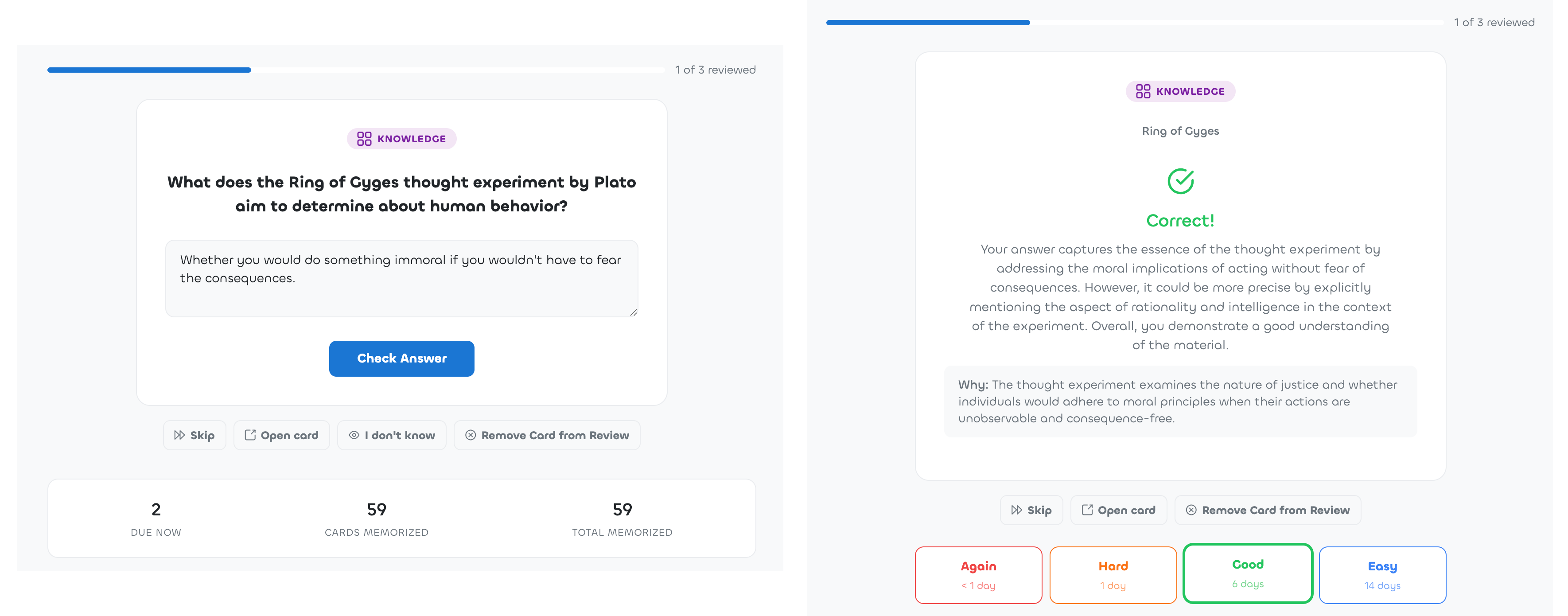
So we removed the friction. While you read in Linkflare, you highlight. Highlights and takeaways become knowledge cards, which you organize into topics. Any card you want to keep, you toggle into review, and the review queue does the rest: it brings each card back right around the time you’d otherwise forget it, at growing intervals. You can grade yourself, or have Linkflare generate a quiz question about the card and evaluate your answer.
Reviewing your own material also feels completely different from studying somebody else’s deck. You picked every single card, so every question is about something you once cared enough to save. A few minutes between two work sessions. It never feels like homework, but fun and thanks to some AI always different and fresh.
With search engines and AI assistants one keystroke away, some people would argue we don’t need to remember anything anymore. Why do you think internalizing knowledge still matters?
Knowledge you carry is the only knowledge you can think with. Connections don’t happen in a database, they happen in your head. You notice that an idea in an article contradicts something from a book you read last year, or that a concept from biology maps beautifully onto a problem at work. If neither of them is in your memory, no search engine will produce that spark for you.
There’s a social side too. Everyone can look facts up now, which is exactly why carrying knowledge has become rarer and more interesting. The most interesting person in the room isn’t the one who can google or ChatGPT fastest. It’s the person who can tell you the story behind the fact, connect it to what you just said, and pull in something surprising from a completely different field. That’s taking advantage of your curious mind.
I actually think AI assistants make remembering more valuable, not less. When answers are cheap, what sets people apart is judgment, taste, and the things they really know. The assistants are great at retrieving. The connecting and the doubting still happen in a human head, and they work with whatever you’ve actually retained.
Who exactly is Linkflare designed for?
Curious people and lifelong learners, first of all. People who read and watch and save a lot, and want it to make them smarter, which only works if you remember any of it later. They’re the ones who get the most out of highlights, knowledge cards, and the review queue.
And people who like order. If you recognize yourself in the mess I described earlier — movie lists on the streaming platforms, books in one app, recipes in chat threads, articles in a read-it-later tool, notes in a PKM system — Linkflare is one tidy home for all of those lists. No clutter, and everything stays findable.
And families. Some of the most-used collections in my own household are the shared ones.
What about you, how do you personally use Linkflare?
Everything I’ve described is from my real account, but here’s a bit more of it. The daily backbone is the inbox: newsletters and feeds land there, and I work through it in idle moments. Our watch list currently holds about sixty movies and shows, sorted by IMDb rating, which has ended more than one “what should we watch” discussion in under a minute. Recipes my fiancée and I save during the week turn into the weekend’s cooking. When we plan a trip, everything goes into a vacation collection, sights, restaurants, hotels, so the itinerary basically assembles itself.
The collection I cherish most is the one we share for our son: things we’d like to get him, places we want to take him. Either of us saves something in passing, and both of us see it.
On the knowledge side, I turn book takeaways and article highlights into knowledge cards. My review habit is nothing heroic: around ten cards a week, in the moments between work sessions when I would otherwise just check email. And lately, because Linkflare has an MCP server, I sometimes let Claude quiz me on my own cards in the middle of a work day. Being interrogated by my own library is still a slightly surreal experience.
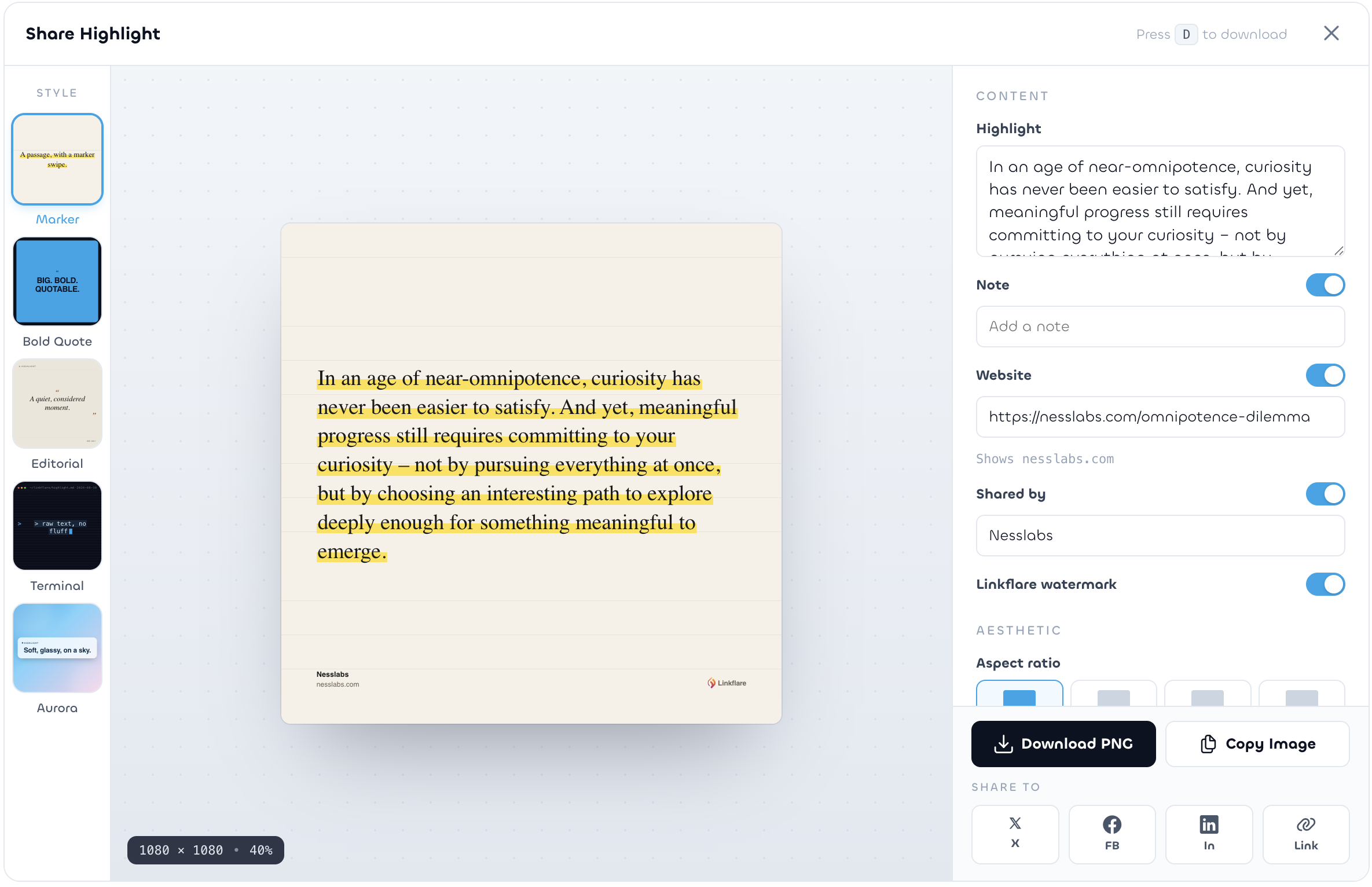
And since we’re at Ness Labs: the highlight in the screenshot below is from one of yours, “The Omnipotence Dilemma”, a line about committing to your curiosity instead of chasing every thread at once — more or less the philosophy behind the whole product. Any highlight can be turned into a share card like that straight from the app.
Looking ahead, how do you see Linkflare and personal knowledge management evolving over the next few years?
There are two things I keep coming back to. The first: your library has to outlive any platform. Pocket’s shutdown was a warning shot for the whole industry. So your data stays exportable, and the business is funded by subscriptions rather than attention, which means I have no incentive to keep you scrolling. A tool for thought has to be on your side.
The second: your library should start working for you. Linkflare has an MCP server, which means AI assistants can, with your permission, search your bookmarks, save new ones, and quiz you on your knowledge cards. I find that direction far more interesting than generic chatbots, because this assistant knows what you’ve collected over the years, not just the internet at large. “What was that article about sleep I saved last year, and what did I highlight in it?” should simply have an answer.
Beyond that, I want the connections to get deeper. The tool should notice that something you save today relates to something you highlighted months ago, and tell you. I think the next years of personal knowledge management will be less about capturing more, because everyone has capture solved, and much more about resurfacing better — showing you the right memory at the moment you can use it, from a library you own.
Thank you so much for your time, David! Where can people learn more about Linkflare?
Everything starts on our website, and you can use it for free. I’m on X and on Bluesky as well, and I’d love to hear how you organize your corner of the web.
For Ness Labs readers we’ve set up something small: the code NESSLABS gets you 30 days of Linkflare Pro for free.
And if you only try one thing, make it a tiny experiment, in proper Ness Labs fashion: for one week, save everything interesting into the inbox instead of leaving tabs open, and spend five minutes a day reviewing what you captured. Watch what it does to your focus, and to how much you remember.